雨云云应用架设FRP进行内网穿透

实验室的服务器没有公网IP,因此在外炼丹比较麻烦,因此使用frp将机器内网穿透出来

一、部署云应用

服务器购买链接:应用详情 | 雨云

简单冲了30块钱,反点很高,冲30给了60,每月消耗6,30块钱用10个月,
性价比很高了,想开的朋友可以用我的邀请码:OTg2Mjg5

1. 配置服务端信息

开好云服务之后,点击管理 ->选择服务器 -> 配置文件 ->

1
2
3
4
5
6
7
8
9
10
11
12
13
14
15
16
bindAddr = "0.0.0.0"
bindPort = 7000

auth.method = "token"
auth.token = "token123456"

webServer.addr = "0.0.0.0"
webServer.port = 7500
webServer.user = "admin"
webServer.password = "admin"

# tls
#transport.tls.force = true
#transport.tls.certFile = "/etc/frp/ssl/server.crt"
#transport.tls.keyFile = "/etc/frp/ssl/server.key"
#transport.tls.trustedCaFile = "/etc/frp/ssl/ca.crt"

默认是长这个样子的,后面主要是配置这里

二、安装frpc

服务器就先这样,接下来要在被代理的机器上安装客户端frpc。服务器上的版本是0.65.0,注意需要对应。
Releases · fatedier/frp
安装好后解压、修改frpc.toml,修改为服务器的ip。

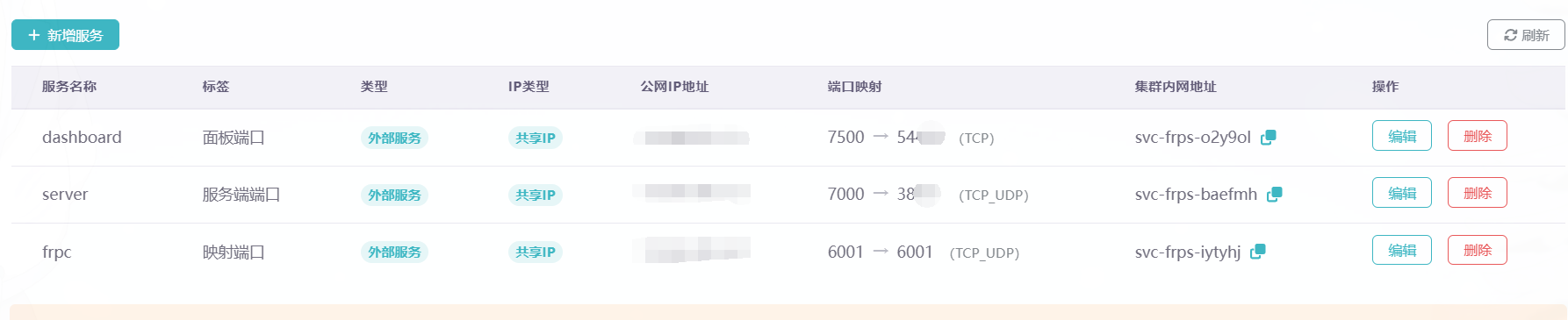
服务器的ip在雨云-> 应用管理 -> 服务 上,填入serveraddr和port上

1
2
3
4
5
6
7
8
9
serverAddr = "xxx.xxx.xxx.xxx"
serverPort = xxxx

[[proxies]]
name = "ssh"
type = "tcp"
localIP = "127.0.0.1"
localPort = 22
remotePort = 6000

启动服务测试

1
2
chmod +x ./frpc
./frpc -c ./frpc.toml
1
2
3
4
5
6
2026-03-02 16:05:37.305 [I] [sub/root.go:149] start frpc service for config file [./frpc.toml]
2026-03-02 16:05:37.305 [I] [client/service.go:325] try to connect to server...
2026-03-02 16:05:37.340 [E] [client/service.go:310] token in login doesn't match token from configuration
2026-03-02 16:05:37.340 [W] [client/service.go:328] connect to server error: token in login doesn't match token from configuration
2026-03-02 16:05:37.340 [I] [sub/root.go:167] frpc service for config file [./frpc.toml] stopped
login to the server failed: token in login doesn't match token from configuration. With loginFailExit enabled, no additional retries will be attempted

忘记写token了,重新配置一下frpc.toml

1
2
3
4
5
6
7
8
9
10
11
serverAddr = "xxx.xxx.xxx.xxx"
serverPort = xxxx
auth.method = "token"
auth.token = "xxxxxx"

[[proxies]]
name = "ssh"
type = "tcp"
localIP = "127.0.0.1"
localPort = 22
remotePort = 6001

三、测试连接

不知道为什么frpc的远端端口必须要设置为6001才好事,不过不管怎么说,把端口映射出去总能用了

最后,把frpc放到systemd中守护一下

1
sudo nano /etc/systemd/system/frpc.service
1
2
3
4
5
6
7
8
9
10
11
12
13
[Unit]
Description=frp client
After=network.target syslog.target
Wants=network.target

[Service]
Type=simple
ExecStart=/usr/local/frp/frpc -c /usr/local/frp/frpc.toml
Restart=on-failure
RestartSec=10

[Install]
WantedBy=multi-user.target

启动服务:

1
sudo systemctl start frpc

开机自启动:

1
sudo systemctl enable frpc

查看服务状态:

1
sudo systemctl status frpc

收工!

参考资料


雨云云应用架设FRP进行内网穿透
http://blog.mingxuan.xin/2026/03/02/20260302/
作者
Obscure
发布于
2026年3月2日
许可协议